2. Modifying Statements
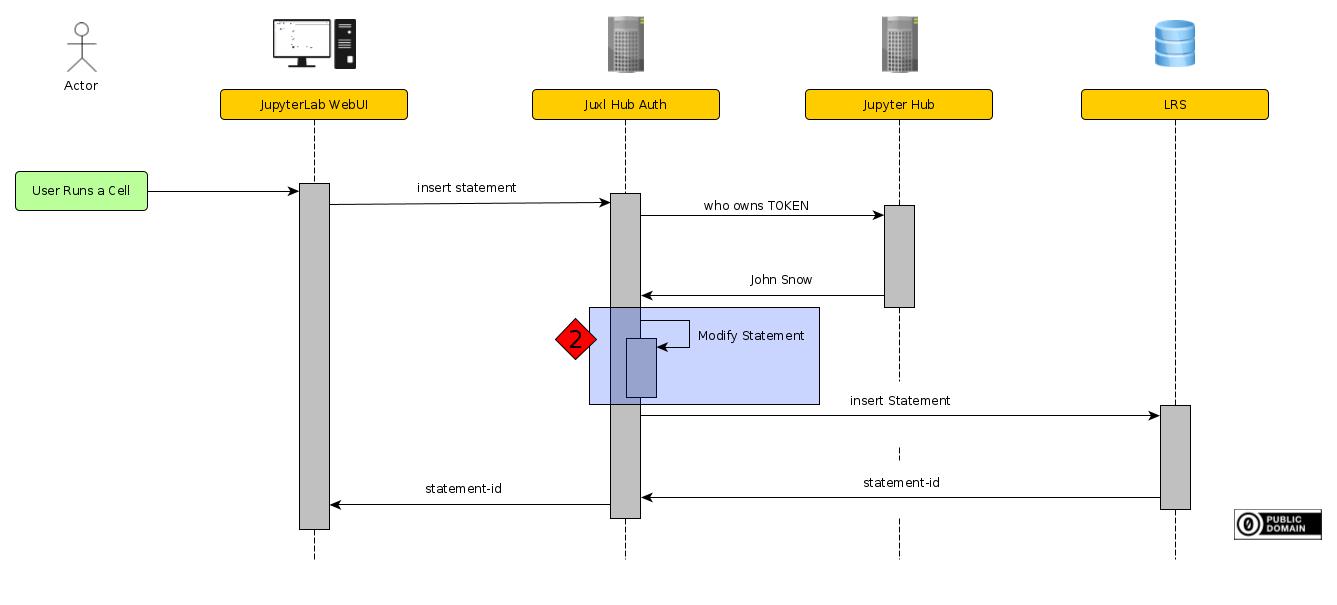
The second task after at receiving a request is to modify the statements.
//TODO link why we need to modify statements
This step could contain multiple sub-steps. There are many reasons why a statement should be modifyied and ways to modify a statements. At this state there is only one modification taking place: Replacing the statement actor.
2.1. Replacing the Statement Actor
A minimal could look like this:
{
  "actor": {
    "objectType": "Agent",
    "account": {
      "homePage": "https://not_my_jupyter.com/hub",
      "name": "Not_John_Snow",
    },
    "name": "Not_John_Snow",
  },
  "verb": {
    "id": "http://adlnet.gov/expapi/verbs/completed",
  },
  "object": {
    "id": "http://example.com/activities/exercise-3",
  }
}
Jet, the actor could contain any value. The user is able to replace any statement value. A malicious user might replace their actor with another actor.
To ensure that users can only insert statements about themself, the actor value is replaced by a generated value. Since Juxl-Hub-Auth has already authenticated the user using the token (see Authenticating JupyterHub User), we can use the authenticated user as the actor.
Therefore, users can only insert statements about themself.
2.2. Anonymous Actor
Juxl-Hub-Auth also supports anonymization. Depending on the Configuration of Juxl, the actor might be one of the following:
A anonymous actor:
{
  "objectType": "Agent",
  "account": {
    "homePage": "http://accounts.anonymous",
    "name": "anonymous",
  },
  "name": "Anonymous",
}
A pseudo-anonymous actor:
{
  "objectType": "Agent",
  "account": {
    "name": "pseudo-anonymous-x34g3gpyb",
    "homePage": "http://accounts.pseudo-anonymous",
  },
  "name": "pseudo-anonymous-x34g3gpyb",
}
Or a JupyterHub actor:
{
  "objectType": "Agent",
  "account": {
    "homePage": "https://jupyter.rwth-aachen.de/hub",
    "name": "John_Snow",
  },
  "name": "John_Snow",
}
Depending on the account.homPage key, the following actions take place:
If account.homPage equals http://accounts.anonymous, or http://accounts.pseudo-anonymous the actor is not replaced, because it is assumed, that the user wants to stay anonymous.
Otherwise, the actor is replaced by the authenticated JupyterHub actor.
In more detail, the xAPI actor of the following JupyterHub at <jupyte_hub_url> user:
{
"kind": "user",
"name": "<name>",
"admin": false,
"groups": ["affiliation-member@rwth-aachen.de", "affiliation-student@rwth-aachen.de"],
"server": null,
"pending": null,
"created": "2021-01-12T13:52:19.892397Z",
"last_activity": "2021-07-21T16:36:40.422526Z",
"servers": null
}
is:
{
  "objectType": "Agent",
  "account": {
    "homePage": "<jupyte_hub_url>",
    "name": "<name>",
  },
  "name": "<name>",
}