1. Authenticating JupyterHub User
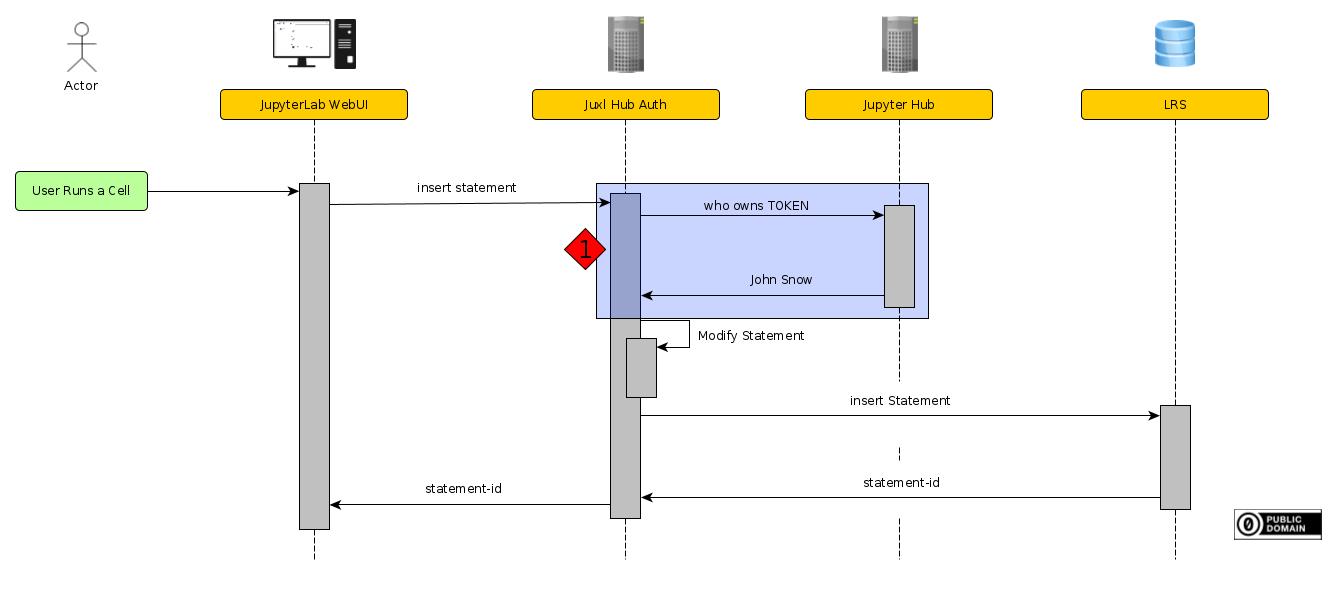
The first task after at receiving a request is to authenticate the User.
//TODO link why we need jupyterHub authentication
A insert statement request from Juxl contains a JupyterHub token. To validate the token, Juxl-Hub-Auth uses the JupyterHub API.
1.1. Using the JuypyterHub Api
To manually test the JupyterHub Api, a simple curl request can be used. The following code shows a curl request to the RWTH-JupyterHub. The token value and JupyterHub url value have to be changed.
curl -X GET -H "Authorization: token 7898d6e6dfd54f639b1fda2906ef5010" "https://jupyter.rwth-aachen.de/hub/api/user"
The JupyterHub will then reply with information about the user. Here is an example output:
{
"kind": "user",
"name": "John_Snow",
"admin": false,
"groups": ["affiliation-member@rwth-aachen.de", "affiliation-student@rwth-aachen.de"],
"server": null,
"pending": null,
"created": "2021-01-12T13:52:19.892397Z",
"last_activity": "2021-07-21T16:36:40.422526Z",
"servers": null
}
Juxl-Hub-Auth receives the token Authentication value from Juxl for each request. It then uses the name property to access the JupyterHub username.